
Kaptrum DESK + SCOUT Suite
Wi-Fi and Bluetooth Analysis & Correlation
Unified collection, analysis, and reporting in one workflow. From field capture to correlated findings — no separate tools, no cloud dependency.
Why Kaptrum
Kaptrum brings collection, analysis, and reporting into one streamlined workflow — saving time, reducing manual effort, and surfacing relevant findings faster.
Built by operators who use it. Designed for the realities of field work: offline operation, local data control, and the need to correlate observations across time and space without external dependencies.
Streamlined Workflow
Collection, analysis, and reporting in one unified process.
Efficiency & Speed
Save time, reduce manual effort, and get faster findings.
Field-Ready Design
Built by operators for real-world field work scenarios.
Independent Operation
Offline capability, local data control, no external dependencies.
The difference is clear once you see it in action.
SCOUT — Passive Field Collection
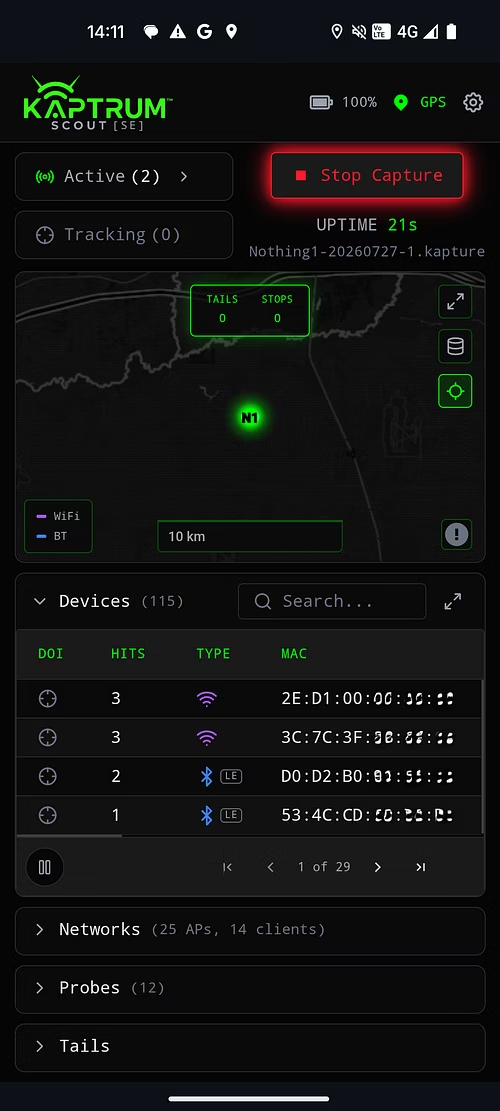
SCOUT captures Wi-Fi and Bluetooth passively in the field, logging every detection with GPS coordinates and precise timestamps. Designed for operators who need offline collection, local data retention, and the flexibility to work without cloud connectivity.
Key Capabilities:
- •Runs on SBCs, laptops, and Android devices
- •Passive Wi-Fi, Bluetooth Classic, and BLE capture
- •Probe request and handshake logging
- •GPS and timestamp on every observation
- •Device-of-Interest (DOI) lock with team mesh alerts
- •.kapture binary recording format for efficient storage
- •Live feed streaming or offline collection
- •Incognito display mode for field operations
All data stays local until you decide to transfer it to DESK for analysis.
DESK — Analysis & Correlation
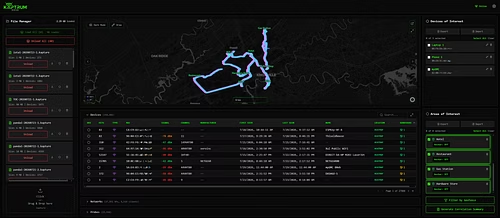
DESK runs on Windows or Linux — no cloud required. Ingest .kapture files from SCOUT devices or connect multiple SCOUTs live for real-time analysis. Correlate repeated RF identifiers across geofences, areas of interest, routes, and time windows to surface patterns and findings.
Key Capabilities:
Windows and Linux deployment (on-premises only)
Support for up to 10 live SCOUT connections
Geofence and area-of-interest (AOI) filtering
Device-of-Interest detection and alerting
Repeated-presence correlation across time and space
Interactive visualization of findings
Export to PCAPNG, KMZ, CSV, and PDF formats
Whitelist known devices to focus on unknowns
DESK transforms raw RF observations into actionable intelligence without leaving your environment.
Streamlined Workflow
Traditional RF Analysis
Traditional RF analysis splits the work across multiple tools:
- •Separate collection software for field capture
- •Mapping software for geospatial context
- •Spreadsheets for manual correlation
- •Multiple exports and file conversions
- •Repeated cross-file comparison to find patterns
Kaptrum Brings it Together
One unified workflow from collection through analysis to reporting. SCOUT captures with GPS and timestamps. DESK correlates across geofences and time. Export findings as PDF, KMZ, or CSV. No context switching. No manual exports. No repeated work.
The result: findings surface faster, and operators spend less time managing data and more time acting on intelligence.
Data Handling & Scale
Kaptrum is built for operators who need control over their data.
Local, Customer-Controlled Data
All RF observations, correlations, and reports stay on your hardware. No cloud upload. No telemetry. No external dependencies. You own your data from collection to export.
No Cloud Dependency
DESK runs on Windows or Linux in your environment. SCOUT devices operate offline or over your VPN. Kaptrum works in air-gapped networks, remote locations, and restricted connectivity zones.
Identifiers Logged As Observed
Kaptrum logs MAC addresses, SSIDs, and RF signatures exactly as detected. Attribution and analysis are the operator's responsibility — Kaptrum provides the raw intelligence and correlation tools.
Performance & Scale
Capacity depends on your host device's available storage and memory. Typical deployments handle thousands of observations per minute across multiple geofences. For specific performance requirements, contact us for a technical evaluation.
Deployment Options
Kaptrum adapts to your operational needs — whether you're collecting offline in the field or running a live, centralized analysis center.
Offline Collection & Transfer
Deploy SCOUT devices for passive field collection. Record .kapture files locally, then transfer them to DESK for analysis when you return to base. No network required in the field.
Live Multi-Device Analysis
Connect multiple SCOUT devices to DESK over your VPN for real-time, centralized analysis. DESK correlates observations across all active SCOUTs while SCOUTs continue to mesh peer-to-peer for redundancy. All data remains on your hardware.

See Kaptrum in Action
Ready to see how Kaptrum streamlines RF collection, analysis, and reporting? Schedule a live demo with our team. We'll walk you through SCOUT field capture, DESK correlation, and real-time findings — using your own data or our test environment.
Contact us to discuss your specific operational needs and explore how Kaptrum fits into your workflow.
Frequently Asked Questions
"Built by the Operators Who Use It."
One workflow — collection, analysis, reporting — surfacing findings faster.
How do SCOUTs and DESK connect?
Encrypted link over your VPN. SCOUTs mesh peer-to-peer without DESK.
What hardware is needed?
SCOUT runs on SBCs, laptops, and Android. DESK runs on Windows or Linux — no cloud required.
What does Kaptrum correlate?
Repeated identifiers across geofences, routes, and time windows.
How does data move to analysis?
Drag-and-drop .kapture files or stream live — DESK analyzes while recording continues.
Does it identify a person?
No. Kaptrum logs RF identifiers only; attribution is the analyst's process.
What data leaves my environment?
None. No cloud, no telemetry — all data stays on your hardware.
What happens when a DOI appears?
DESK and all SCOUTs alert — on-screen and audible — and share the alert across the team.
EVAL READY — Demo live fleet view, offline analysis, and report export on your own data.